

I wear a Garmin watch essentially all the time. It tracks my sleep, stays on through the workday, and obviously handles my workouts. I like having the health data, I like being able to glance at the time, and after years of wearing one, having a Garmin on my wrist is just part of my routine.

That raised an obvious question when CIRQA launched: if I already wear a Garmin watch 24/7, what would CIRQA actually add?
For someone like me, the answer is not much. Nearly everything CIRQA is designed to track is already being captured by the Garmin watch on my wrist. Where CIRQA becomes much more interesting is for Garmin users — or potential Garmin users — who do not want to wear a smartwatch all day.

What CIRQA actually is
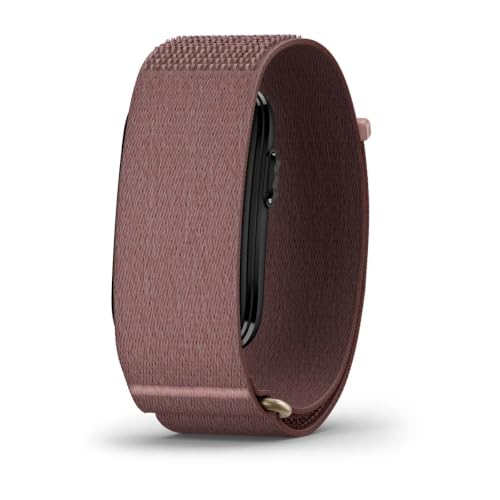
The easiest way to think about CIRQA is that it is Garmin’s health and training experience stripped of the screen and GPS/GNSS. Its sensor module measures 27 × 47 × 9 mm and weighs about 14.8 grams on its own, or roughly 21 grams with the included ComfortFit strap.
Because there is no display, everything runs through Garmin Connect. The major features include Training Readiness, Training Status, VO2 Max, HRV Status, Body Battery, and Health Status, along with advanced sleep tracking, all-day heart rate, stress and respiration, more than 80 activity types, automatic activity detection, optional Pulse Ox, skin temperature, LiveTrack, and Smart Wake. The full feature and specification list is on the CIRQA Smart Band page.
There is also a physical button that can be used to start a favorite activity directly from the band.
Price-wise, CIRQA sits between Fitbit Air and WHOOP: the band costs $199.99 once, with no required subscription for its core Garmin Connect features, which is $100 more than Google’s Fitbit Air. WHOOP hardware is tied to an annual membership ranging from about $199 for One to $359 for Life, depending on the hardware and software tier. Our full CIRQA, WHOOP, and Fitbit Air comparison breaks down the differences.
CIRQA looks very different from a Garmin watch, but the data it feeds into Garmin Connect should feel familiar to anyone already in the ecosystem.
Size, fit, and everyday comfort
CIRQA is noticeably lighter than wearing a Garmin watch, and its soft 24 mm ComfortFit strap can be worn on the wrist or swapped for an optional upper-arm band. The hook-and-loop closure also makes it easy to adjust the fit for sleep or workouts.

The sensor module itself is long, though, spanning a noticeable amount of the top of the wrist. I noticed it at first, but like most wearables, it became easier to ignore with prolonged wear.
Where CIRQA fits for existing Garmin users
If you already wear a Garmin watch day and night, CIRQA adds very little. The latest Garmin watches already capture everything CIRQA does.
CIRQA makes more sense for people who wear a Garmin only for workouts, prefer a mechanical watch (or no watch) during the day, or do not want to sleep in a full-size GPS watch. It fills those gaps while keeping health and recovery data in one place: Garmin Connect, without a required subscription for the core features.
Garmin will inevitably earn another $200 from a percentage of loyal existing users who want CIRQA as a second device, but the bigger opportunity lies elsewhere.
The bigger opportunity for Garmin
The bigger opportunity is converting non-Garmin users into the Garmin ecosystem with CIRQA. Whoop proved there is a market for sleep, recovery, and health tracking without another screen, and CIRQA gives those buyers access to Garmin Connect without requiring them to buy a traditional Garmin watch.
With no display or meaningful on-device interaction, nearly the entire experience happens in the app. That is where Whoop already has a clear advantage.
Where Whoop beats Garmin: the app
Hardware is only half the story. If CIRQA is Garmin’s way into the screenless category that Whoop built, the comparison that matters most is what happens on the phone — because that is where both products actually live.
I have spent real time in both apps. On design and on depth of detail, Whoop is clearly ahead of Garmin Connect right now.

Garmin Connect’s homepage is useful, but its new Essentials tiles rely on icons that are not especially intuitive. Sleep, Body Battery, Training Readiness, and HRV Status are all in one place, although the symbols take a moment to decode. I often have to pause and analyze a logo before understanding which metric it represents.
Whoop’s home looks cleaner and is easier to scan: Sleep, Recovery, and Strain are clearly labeled as the three rings you organize your day around, with Healthspan updates pushed forward instead of buried. Same idea when you open the daily recovery views side by side.

Training Readiness is a useful Garmin feature and I use it, but Whoop’s Recovery screen puts the contributing numbers — HRV, resting heart rate, respiratory rate, sleep performance — on the same card as the score, with baselines and trend arrows. You see why the day is yellow or green without digging through four separate glances.
Fitness Age vs Whoop Age / Healthspan
The difference between the two platforms becomes especially noticeable in how they approach fitness age.

Garmin Fitness Age tells me I am 26.5 versus a chronological age of 35, then lists four “On Target” cards: vigorous minutes, vigorous days, resting heart rate, body fat. It is fine as a summary, but it is much less clear how hard each lever moves the score, or what happens if one slips.
Whoop Healthspan leads with Whoop Age, years younger, and Pace of Aging on one screen. That alone is a different product pitch, not just “are you fit now” but “how are you aging.”

Garmin’s year chart is a single line. Whoop shows Whoop Age against chronological age, plus a separate Pace of Aging trend with storytelling built into the UI.
Then Whoop goes further and breaks the age score into weighted inputs — each with an impact measured in years, 6-month vs 30-day averages, and plain-language coaching.


VO2 Max is worth −3.5 years. RHR is worth −1.7. Sleep consistency, hours of sleep, time in zones, strength minutes, steps — each one shows whether you are outperforming or falling off, and by how many years. Garmin Fitness Age never gets that specific. You get maintain-this checklists, but do not get “this metric is pulling your age down by X.”
In both design and depth of detail, Whoop still has the advantage here.
Conversational AI vs Garmin Connect+ AI
The AI gap extends beyond Whoop and Garmin. Whoop Coach lets you ask about strain, sleep, recovery trends, or the day’s workout and then continue with follow-up questions, making it an interactive layer over your health data rather than a one-time summary.

Garmin’s Active Intelligence is available only through the paid Connect+ subscription and appears as a short card on the Connect home feed. Mine recently reported that my time in heart rate zones 3–5 had increased 12% over four weeks and that my load balance was on target. That is useful as a quick observation, but there is no chat or follow-up, and the insight is often too generic to change what I do.
Even Strava’s non-interactive Athlete Intelligence provides a more useful activity summary, covering pacing, negative splits, recent mileage, and time in heart rate zones. Whoop remains the strongest of the three because it is conversational, although it has one important limitation for me: most of my running history lives in Garmin, so Whoop cannot see the full picture.
That makes Connect+ feel like a missed opportunity. Garmin already has my health data and complete run and activity history; if Active Intelligence let me explore that data through an ongoing conversation, the subscription would become far more valuable—especially for a screenless product like CIRQA, where the app is central to the experience.
Hardware and bands vs Whoop
I also wore CIRQA and Whoop together for a direct feel comparison.

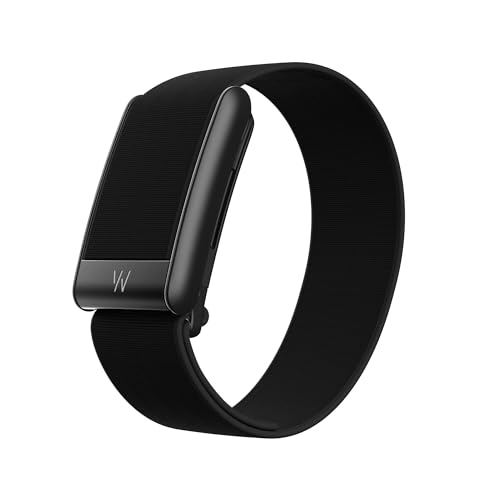
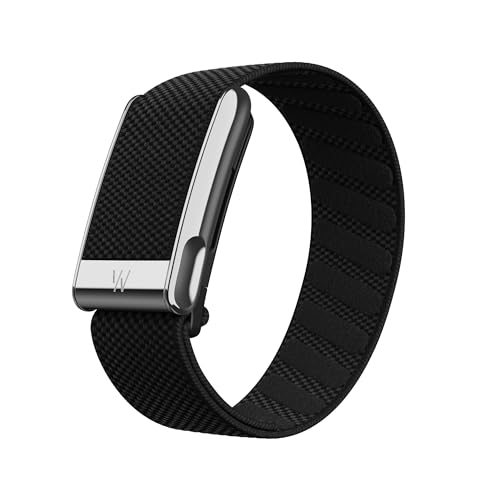
I liked the subtler look of CIRQA’s band. Whoop’s clasp with the big W logo is fine, but it has become a statement piece. CIRQA’s ComfortFit strap is just fabric — no branded metal plate sitting on top of the wrist — and that cleaner look worked better for me day-to-day.
On size, though, CIRQA felt noticeably bigger because its module runs farther across the wrist, as seen in the photo above. It has a larger overall footprint than Whoop’s puck, although it is a bit thinner.

It is possible that one device is more accurate than the other for a particular health metric, but both were directionally consistent and produced relatively similar results in my use. That makes accuracy unlikely to be the deciding factor for most buyers.
Battery should not be a major deciding factor either: Garmin claims up to 10 days for CIRQA, while WHOOP claims 14+ days for 5.0 and MG. WHOOP Peak and Life have the convenience advantage of a waterproof wireless PowerPack that clips on and charges the device while it remains on your wrist, although the entry-level One bundle does not include it.
The top-tier WHOOP Life membership also includes WHOOP MG hardware with on-demand ECG and daily blood pressure insights, neither of which CIRQA offers, which could be deciding features in their own right.
Who CIRQA is for
CIRQA is not for me because my Garmin stays on around the clock, but it makes sense for existing Garmin users who want continuous data while their watch is off. For someone choosing a first screenless tracker, its one-time $199.99 price and lack of a required subscription are compelling.
That being said, WHOOP offers the stronger app, deeper interpretation, and interactive AI, but costs roughly $199 to $359 every year. Garmin could narrow that software gap with a sharper Connect experience and better AI, but it is unclear whether it will succeed at that.
Whatever you choose, Garmin’s strategy is clear: it wants a device for everyone. Its broad watch catalog already spans nearly every sport, design style, wrist size, and audience, while the screenless CIRQA Smart Band and evidence of an upcoming CIRQA Smart Ring show that it is extending that same breadth beyond traditional watches to people who may not want a watch at all.


For me it was a disappointment. It’s too bulky, too expensive, and ugly. Only the material of the strap feels pleasant. Data sync with older Garmin devices (old software platform) doesn’t seem to exist. After syncing the Cirqa, the data recorded by the Cirqa didn’t transfer to a FR955; I just see gaps on the FR955 (for Body Battery, stress, etc.). I returned the Cirqa because it turns the concept of a complete ecosystem into a bad joke.
I bought it when it launched and quickyl realized that I belong to the group of people that wears my watch 24/7. Tried to sleep with the Cirqa a few nights, but woke up and starred at the Cirqa to see the time (habits die hard). Not a device for me…